Connect with Customers Instantly, 24/7
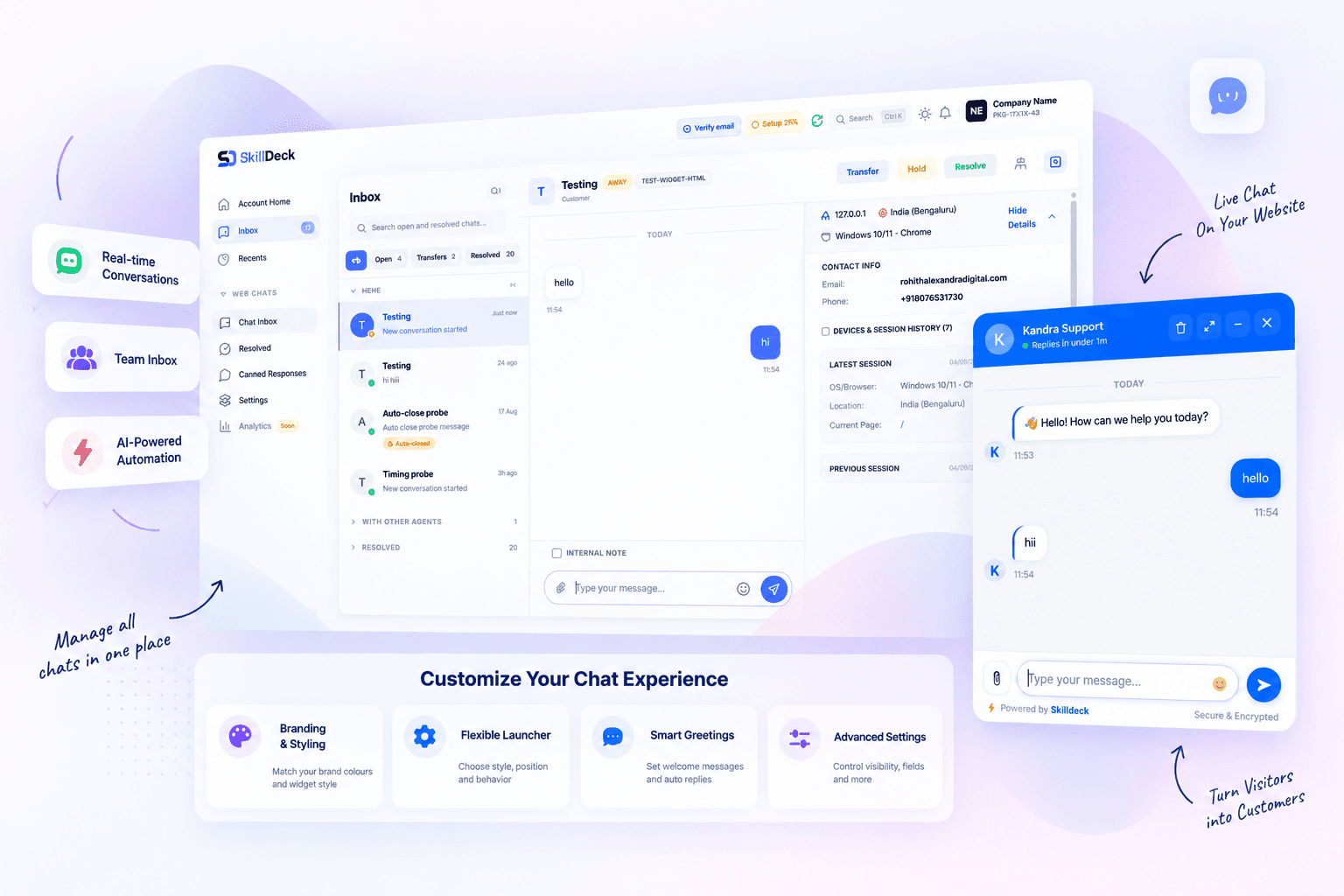
Engage visitors in real time with a live chat widget, a shared team inbox, canned responses and full visitor context and turn every conversation into a lead.
Live Chat
Real-time support
Team Inbox
Pick, transfer, hold
Canned Responses
Reply in one keystroke
Visitor Insights
Page-by-page context
3M+
Conversations
15K+
Active Teams
<30s
Avg Response
+35%
Conversion lift
Powerful Chat Features
Live Chat
Real-time support
Team Inbox
Pick, transfer, hold
Canned Responses
Reply in one keystroke
Visitor Insights
Page-by-page context
Powerful Chat Features
Live Chat Widget
One script tag on any site. The widget mounts in a Shadow DOM so your styles and ours never collide.
Team Inbox
Live and resolved chats in one list, with search, self-pick, transfer, hold and internal notes.
Canned Responses
Reusable replies behind triggers like /pricing, with impressions, clicks and conversions tracked per response.
Visitor Insights
IP, country, city, OS, browser, device and the exact page-visit history for every session.
Cross-Device History
Chats from the same person on different devices are grouped by email or phone into one merged transcript.
Start Connecting with Customers
Configure
Set up your users, roles, content, fields, and workflows.
Connect
Bring related teams, data, and processes together.
Automate
Reduce repetitive work with rules, notifications, and workflows.
Grow
Use connected data and analytics to improve outcomes.
Performance
Powerful Chat Features
Everything you need for exceptional customer support
Start Connecting with Customers
Share your requirements and we'll help you set up live chat in minutes
Flexible Pricing for Every Business
Skilldeck is made affordable for everyone. No matter the size or stage of your business, Skilldeck fits.
Starter
Best for individuals & early-stage teams getting started Everything you need to launch and validate your use case. Ideal for small teams or first-time users who want core features with essential support.
- Core features
- Limited users/projects
- Basic integrations
- Email support
Growth
Best for growing teams ready to scale Designed for businesses that need more power, flexibility, and automation as usage increases.
- Advanced features
- Higher usage limits
- Popular integrations
- Priority support
- Free SEO For CoursesFree
Business
Best for established businesses & high-volume usage Built for teams that need performance, control, and advanced collaboration across departments.
- Full feature access
- High usage & user limits
- Advanced security & permissions
- Dedicated account support
- Free SEO For CoursesFree
- Free Google Ads Up to 1 Lakh Budget₹1L Budget
Turn Better Operations Into Growth
3M+
Conversations
15K+
Active Teams
Custom Branding
Colours, agent name and avatar, welcome and pre-chat copy, launcher style, text, icon and screen corner.
Pre-Chat Form
Ask for name, email and phone before the chat starts — each field shown or required independently.
Resolution Survey
The agent requests resolution; the visitor accepts, rejects or ignores it and leaves a 1-5 star rating with feedback.
Offline Message Capture
When nobody replies in time the widget asks for an email or phone number and files the chat as an offline message.
A Practical Alternative to Tool Fragmentation
How We Partner
CRM Lead Sync
A visitor who leaves an email becomes a lead in your CRM automatically, tagged with the webchat source.
File & Image Sharing
Visitors and agents exchange files through presigned S3 uploads, with a size cap and a MIME allowlist.
Live Typing & Presence
Watch the visitor type in real time and see whether they are on the page, on another tab, or gone for good.
Agent Alerts
Sound, desktop notification, flashing tab title and web push, so a new chat lands even with the browser closed.
3M+
Conversations
15K+
Active Teams
<30s
Avg Response
+35%
Conversion lift
Built to Improve the Way Your Team Works
Where We Excel
Internal Notes
Leave notes on a conversation that your team can read and the visitor never sees.
Roles & Permissions
Separate rights to view, pick, reply, hold, transfer, resolve, and manage canned responses and settings.
One-Click Deployment
Copy the embed snippet, or auto-deploy the widget straight to your SkillDeck website.
Secure Realtime
WebSocket connections with origin validation, per-IP connection limits and crawler suppression.
Coming Soon to Web Chat & AI Chatbot
Get early access as these ship
Start now and pick up each release automatically.
One connected ecosystem
Combine Web Chat & AI Chatbot with the other SkillDeck modules and keep your data, workflows, and reporting in one place.
One Platform. Zero Chaos.
Replace disconnected tools with a unified training-business platform.
14+
Connected services
Less
Operational complexity
24/7
Cloud accessibility
One
Platform to run your training business
Services that move your training business
Everything a training business needs to grow — built, run and supported by one team.
- 01Kanban PipelineUTM & Geo CaptureLead Scoring
Customer Relationship Management
Capture every enquiry with its campaign, location and page history attached, work it on a kanban pipeline with notes, follow-ups and scoring, and see the payment it turned into — all on one record.
4.8500+ clients - 02Rich EditorPattern LayoutsScheduled Publishing
Website Builder & CMS
Run every page of your site from one place — courses, services, articles, galleries, projects and patterns — with autosaved drafts, scheduled publishing, per-page SEO and a headless API to serve it all.
4.85K+ clients - 03CSV & ExcelRow ValidationRetryable Jobs
Bulk Upload Tools
Import leads, batches, metadata and redirects from CSV or XLSX — with a template for every importer, row-level validation, retryable background jobs and a transaction behind every run.
4.8500+ clients - 04Four GatewaysCoupons & TaxFraud Signals
E-commerce Module
Sell courses, services and batch seats online through four payment gateways — with coupons, per-country tax, multi-currency pricing, refunds, fraud signals and full campaign attribution on every transaction.
4.810K+ clients - 05Session CalendarClassroom or OnlinePaid Registration
Events & Webinar Management
Schedule sessions, workshops and multi-session batches on a shared calendar with their own timezone, venue and meeting link — assign a trainer, take paid registrations and turn interest into leads.
4.8500K+ clients - 06Career PathsSalary InsightVerified Certificates
Job Portal
Show learners where a course leads — the career path, the certification route and what the skill pays — and back it with verifiable completion certificates and job-assistance flags on every batch.
4.8200K+ clients
Showing 6 of 15 servicesShowing 9 of 15 services
Frequently Asked Questions About Web Chat & AI Chatbot
Still not sure?
Talk to our team for a straight answer, not a sales pitch.
SkillDeck Web Chat & AI Chatbot is part of one connected platform for training institutes, coaching centres, corporate learning teams and EdTech businesses. Engage visitors in real time with a live chat widget, a shared team inbox, canned responses and full visitor context — and turn every conversation into a lead.
Teams run it as a web chat & ai chatbot from day one. It works as a web chat & ai chatbot software without stitching separate tools together. Everything you expect from a web chat & ai chatbot platform is included out of the box. Everything you would expect from “SkillDeck” is part of it.
What you get
- Live Chat Widget — One script tag on any site. The widget mounts in a Shadow DOM so your styles and ours never collide.
- Team Inbox — Live and resolved chats in one list, with search, self-pick, transfer, hold and internal notes.
- Canned Responses — Reusable replies behind triggers like /pricing, with impressions, clicks and conversions tracked per response.
- Visitor Insights — IP, country, city, OS, browser, device and the exact page-visit history for every session.
- Cross-Device History — Chats from the same person on different devices are grouped by email or phone into one merged transcript.
- Custom Branding — Colours, agent name and avatar, welcome and pre-chat copy, launcher style, text, icon and screen corner.
- Pre-Chat Form — Ask for name, email and phone before the chat starts — each field shown or required independently.
- Resolution Survey — The agent requests resolution; the visitor accepts, rejects or ignores it and leaves a 1-5 star rating with feedback.
- Offline Message Capture — When nobody replies in time the widget asks for an email or phone number and files the chat as an offline message.
- CRM Lead Sync — A visitor who leaves an email becomes a lead in your CRM automatically, tagged with the webchat source.
- File & Image Sharing — Visitors and agents exchange files through presigned S3 uploads, with a size cap and a MIME allowlist.
For Sales Teams: Convert Visitors into Customers. Real-time engagement tools designed to boost your sales pipeline. For Support Teams: Deliver exceptional customer support. Deliver exceptional customer support with efficiency and empathy.
Share your requirements and we'll help you set up live chat in minutes. Copy one script tag into your site and you are live. The widget renders inside a Shadow DOM, so it cannot be broken by your stylesheets, and SkillDeck websites can deploy it with a single toggle instead.