Secure Cloud Storage With Built-In Image Compression And A Private Vault
Upload whole folders, shrink images before they leave your browser, lock sensitive files behind your own vault password and share the rest with your team. SkillDeck Cloud Storage connects every file to your website, courses and CRM, with versions, activity history and 30-day recovery built in.
Compression Built In
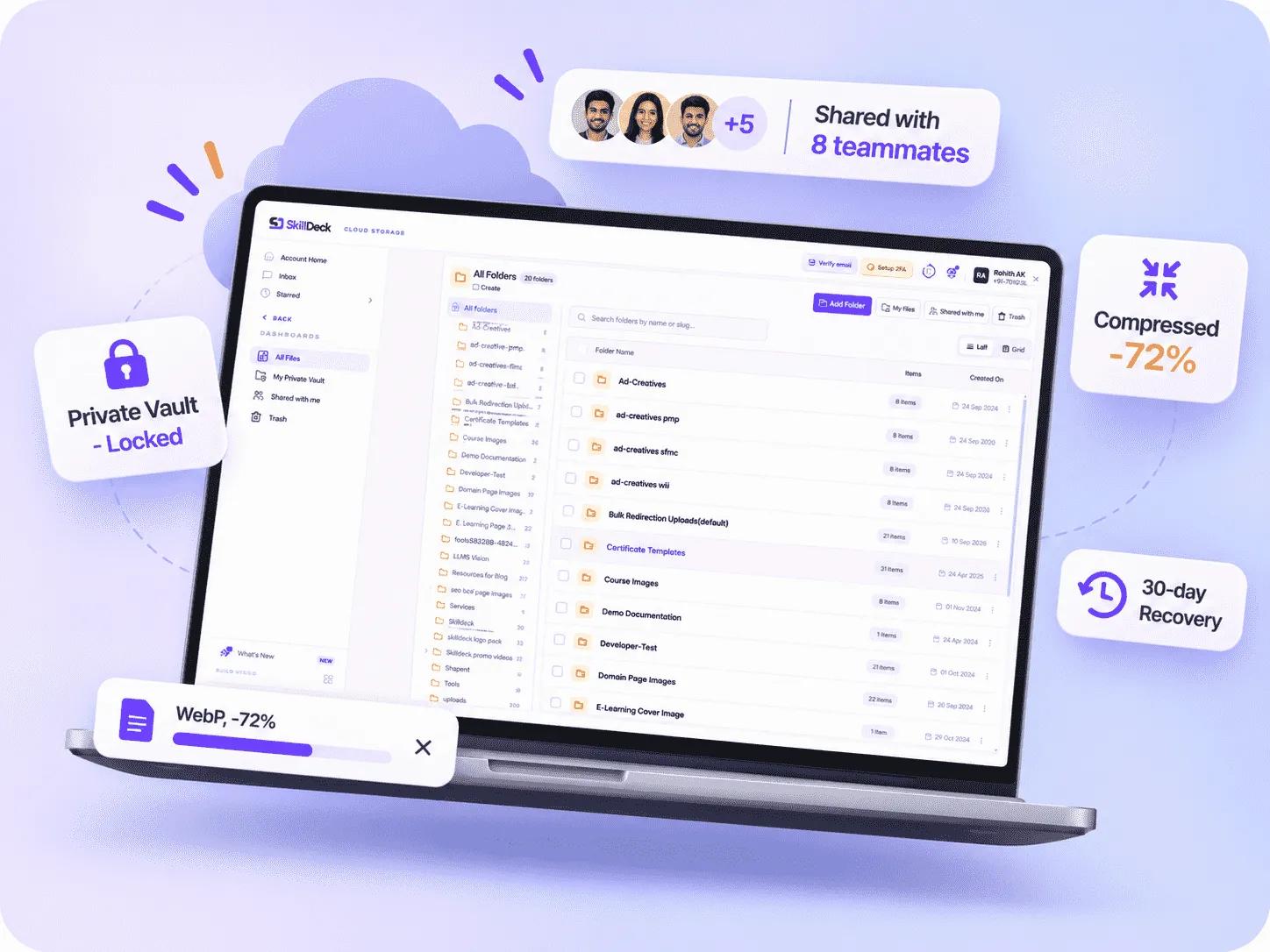
Images are compressed and resized in the browser before upload, saving upload time and storage. Your choice is remembered for next time.
A Private Vault For Every User
Lock any folder in My Files behind your own password. Unlocking works per browser tab, and a forgotten password is reset by email.
Sharing With Roles
Viewers can see and download. Editors can also upload, edit, move and send files to Trash.
Links That Never Break
Move or replace files and every page using them keeps working, because the link stays the same.
3 formats
Convert images to WebP, JPEG or PNG with your own quality level and maximum width before upload.
15 min
An open vault locks itself after 15 minutes without vault activity, and on every page reload.
30 days
Replaced file versions and deleted files stay restorable for 30 days.
Unlimited
Create nested folders and move folders along with their contents.
Storage Connected To Everything You Publish
Generic drives just hold files. SkillDeck Cloud Storage makes them lighter, safer and ready to use across your website, courses and campaigns.
Compression Built In
Images are compressed and resized in the browser before upload, saving upload time and storage. Your choice is remembered for next time.
A Private Vault For Every User
Lock any folder in My Files behind your own password. Unlocking works per browser tab, and a forgotten password is reset by email.
Sharing With Roles
Viewers can see and download. Editors can also upload, edit, move and send files to Trash.
Links That Never Break
Move or replace files and every page using them keeps working, because the link stays the same.
What Your Team Gains
SkillDeck Cloud Storage helps businesses manage their digital assets more efficiently through a centralised and secure file management system. From optimising images and organising documents to sharing resources with teams and recovering previous file versions, it simplifies everyday workflows. Businesses can reduce manual file management, improve collaboration and maintain better control over their growing media libraries.
Faster Pages
WebP compression and width limits cut image weight before files reach your website.
Privacy By Default
Compressing a photo removes its EXIF data, including camera details and GPS location.
Find Anything Fast
Filter by type, public or private, size and date, sort six ways, search by name and star favourites.
Mistakes Are Reversible
Restore deleted files from Trash and roll back replaced files for up to 30 days.
No Duplicate Clutter
Files already in your library are flagged before upload, even when the only copy is in Trash.
From Upload To Shared In Minutes
Upload
Drag in files or whole folders. The folder structure is rebuilt, system files are skipped and uploads keep running while you work elsewhere in the dashboard.
Compress
Pick WebP, JPEG or PNG, set quality and a maximum width. Images shrink in your browser before upload, and you see the saving on every file.
Organise
Duplicates are caught by fingerprint before upload. Sort files into nested folders, tag them, star favourites and filter by type, size and date.
Share Or Lock
Share folders with teammates as Viewers or Editors, or lock them in your private vault behind your own password.
Built To Protect And Perform
Speed
Protection
Everything you need to manage files and media, without leaving the dashboard.
See Cloud Storage In Action
Book a free demo and we will walk your team through compression, the vault and sharing.
Flexible Pricing for Every Business
Skilldeck is made affordable for everyone. No matter the size or stage of your business, Skilldeck fits.
Starter
Best for individuals & early-stage teams getting started Everything you need to launch and validate your use case. Ideal for small teams or first-time users who want core features with essential support.
- Core features
- Limited users/projects
- Basic integrations
- Email support
Growth
Best for growing teams ready to scale Designed for businesses that need more power, flexibility, and automation as usage increases.
- Advanced features
- Higher usage limits
- Popular integrations
- Priority support
- Free SEO For CoursesFree
Business
Best for established businesses & high-volume usage Built for teams that need performance, control, and advanced collaboration across departments.
- Full feature access
- High usage & user limits
- Advanced security & permissions
- Dedicated account support
- Free SEO For CoursesFree
- Free Google Ads Up to 1 Lakh Budget₹1L Budget
A Library That Stays Light, Clean And Safe
Compression, duplicate checks, versions and recovery happen automatically, so your library stays useful as it grows.
30 days
To restore deleted files or previous versions.
3 sizes
Max width presets of 1280, 1920 and 2560 px.
Optimise Before Upload
Images are compressed in the browser, so large files never cost upload time or storage.
Check Before Saving
Every file is fingerprinted and compared with your library. Skip it, upload anyway or restore the trashed copy.
Control Who Sees What
Public and private files, role-based permissions, Viewer and Editor shares and a private vault.
Keep Every Change Traceable
File versions and a full activity log show what changed and let you undo it.
Why Teams Move Their Files To SkillDeck
Storage, compression, publishing and sharing in one platform instead of four separate tools.
How We Partner
One Platform
Storage lives next to your CMS, CRM, courses and tasks.
Secure By Default
Private files open only through short-lived signed links, and the vault adds a second password.
Works On Your Phone
A phone app mode with bottom tabs, bulk actions and quick sharing.
Real Support
Our team helps you migrate and structure your library.
500+
Businesses using SkillDeck.
4.8
Average customer rating.
Storage That Scales With You
SkillDeck Cloud Storage provides businesses with a centralised space to manage, organise and protect their digital files as their operations grow. Whether you are starting with a few important documents or handling a large collection of images, videos and business resources, you can manage everything from one dashboard. Create nested folders, organise files using tags, compress images before uploading, and control access through Viewer and Editor permissions. With built-in video streaming, private vault protection, duplicate detection and 30-day file recovery, your team can manage its growing digital library without depending on multiple storage tools.
Where We Excel
Startups
Get organised from day one with nested folders, tags and compression switched on.
Growing Teams
Share folders across departments and control access with roles and permissions.
Content-Heavy Businesses
Stream videos, caption them and keep thousands of images light and searchable.
Remote Teams
Share files with team members and manage access through Viewer and Editor permissions, making collaboration easier across departments.
Extend Your Storage
Need More Space?
Talk to us about storage limits that fit your plan.
Everything In One Library
Every plan with Cloud Storage includes the essentials.
Private Vault
A password-locked space inside My Files for documents nobody else should open.
Your password
Lock any My Files folder with your own vault password.
Auto-lock
Locks after 15 minutes without activity and on reload.
Email reset
Forgot it? Get a reset link by email, or change it any time.
Share-proof
Moving a folder into the vault removes its shares, after a confirmation.
Services that move your training business
Everything a training business needs to grow — built, run and supported by one team.
- 01Kanban PipelineUTM & Geo CaptureLead Scoring
Customer Relationship Management
Capture every enquiry with its campaign, location and page history attached, work it on a kanban pipeline with notes, follow-ups and scoring, and see the payment it turned into — all on one record.
4.8500+ clients - 02Rich EditorPattern LayoutsScheduled Publishing
Website Builder & CMS
Run every page of your site from one place — courses, services, articles, galleries, projects and patterns — with autosaved drafts, scheduled publishing, per-page SEO and a headless API to serve it all.
4.85K+ clients - 03CSV & ExcelRow ValidationRetryable Jobs
Bulk Upload Tools
Import leads, batches, metadata and redirects from CSV or XLSX — with a template for every importer, row-level validation, retryable background jobs and a transaction behind every run.
4.8500+ clients - 04Four GatewaysCoupons & TaxFraud Signals
E-commerce Module
Sell courses, services and batch seats online through four payment gateways — with coupons, per-country tax, multi-currency pricing, refunds, fraud signals and full campaign attribution on every transaction.
4.810K+ clients - 05Session CalendarClassroom or OnlinePaid Registration
Events & Webinar Management
Schedule sessions, workshops and multi-session batches on a shared calendar with their own timezone, venue and meeting link — assign a trainer, take paid registrations and turn interest into leads.
4.8500K+ clients - 06Career PathsSalary InsightVerified Certificates
Job Portal
Show learners where a course leads — the career path, the certification route and what the skill pays — and back it with verifiable completion certificates and job-assistance flags on every batch.
4.8200K+ clients
Showing 6 of 18 servicesShowing 9 of 18 services
Cloud Storage Questions, Answered
Still not sure?
Talk to our team for a straight answer, not a sales pitch.
Before upload, JPEG, PNG, WebP and BMP images are re-encoded in your browser to WebP, JPEG or PNG at the quality you choose, and can be capped at 1280, 1920 or 2560 px wide. GIF, SVG and other files upload unchanged, and an upload is never blocked if compression fails.
A password-locked area of your My Files. Lock any folder with your vault password. The vault opens per browser tab, closes on reload and locks itself after 15 minutes without activity. A forgotten password can be reset by email.
Share a folder or file from My Files with team members as a Viewer, who can see and download, or an Editor, who can also upload, edit, move and send files to Trash. Shared items appear in their Shared with me page.
Each file is fingerprinted and checked against your library. You can skip it and keep the existing copy, upload it anyway, or, if the only copy is in Trash, restore it instead.
Yes. Replace File uploads a new version under the same link, so every page shows it immediately. The previous version is kept for 30 days and can be restored.
It moves to Trash, where it can be restored for 30 days. After that it is deleted automatically.
Businesses work with images, videos, documents. Files support websites, online courses, product catalogues, client projects and internal operations. When assets are spread across separate drives and folders, teams can spend time searching for the right version, checking access permissions or uploading large files repeatedly. SkillDeck Cloud Storage brings these activities into one library within the SkillDeck dashboard.
The platform helps teams organise files while keeping them connected to the tools they already use for business operations. Users can upload individual files or entire folders, retain folder structures and arrange assets into nested folders. Tags, favourites, search and filters make it easier to locate items by file type, visibility, size or date. Sorting options also help users review their library.
Image optimization is included in the upload process. Users can convert supported images to WebP, JPEG or PNG, choose an image quality level and set a maximum width before uploading. Compression takes place in the browser, helping reduce the size of images before they enter the library. The image editor supports cropping, rotating, flipping, resizing and setting a focal point.
Access management is another important part of file organisation. Teams can share files and folders with colleagues using Viewer or Editor roles. Viewers can see and download shared items, while Editors can upload, edit, move and send files to Trash. For sensitive material, users can move folders into a private vault protected by their own password. The vault locks after 15 minutes without activity and when the page is reloaded. Shared access is removed when a folder is moved into the vault, following confirmation.
SkillDeck also includes tools for managing file changes. Duplicate detection checks file fingerprints before upload, helping users identify existing copies. If a file needs updating, the Replace File option uploads a new version under the same link. This means pages using that link can continue to access the updated file without requiring a new link. Previous versions and deleted files remain available for restoration for 30 days.
For businesses that publish video, the library supports video streaming, poster frames and captions in more than 15 languages. Teams can use these capabilities for course lessons. An activity history records file actions including uploads, edits, moves, deletions and restores, helping teams review changes.
SkillDeck Cloud Storage can support education providers managing lesson resources, online stores organising product media, agencies sharing client assets and clinics handling private files. Its features are designed to bring file storage, image preparation, team sharing and recovery into a single workspace. Instead of switching between several tools for asset tasks, businesses can manage their media from the dashboard used for their website, courses and CRM.
Whether a team is building its first organised library or managing a growing collection of business files, SkillDeck provides practical ways to upload, optimise, organise, share and restore digital assets. The result is a more structured file workflow with clear access roles and useful recovery options.