A Task Management Tool Your Whole Team Will Actually Use
Replace sticky notes, WhatsApp reminders and messy spreadsheets with one clear list of who is doing what and by when. Every task has an owner, a priority, a due date and a response, so daily work gets finished instead of forgotten.
Fast To Use
A task needs only a title. Add priority, dates, people and files only when you need them.
Confirmed Ownership
An accept or decline from every assignee replaces 'did you see my message?'.
Private Tasks
Only the assignees and the assigner can see or edit a task.
Inside Your Dashboard
Tasks sit next to your leads, schedules and payments, with no extra app to install.
1 list
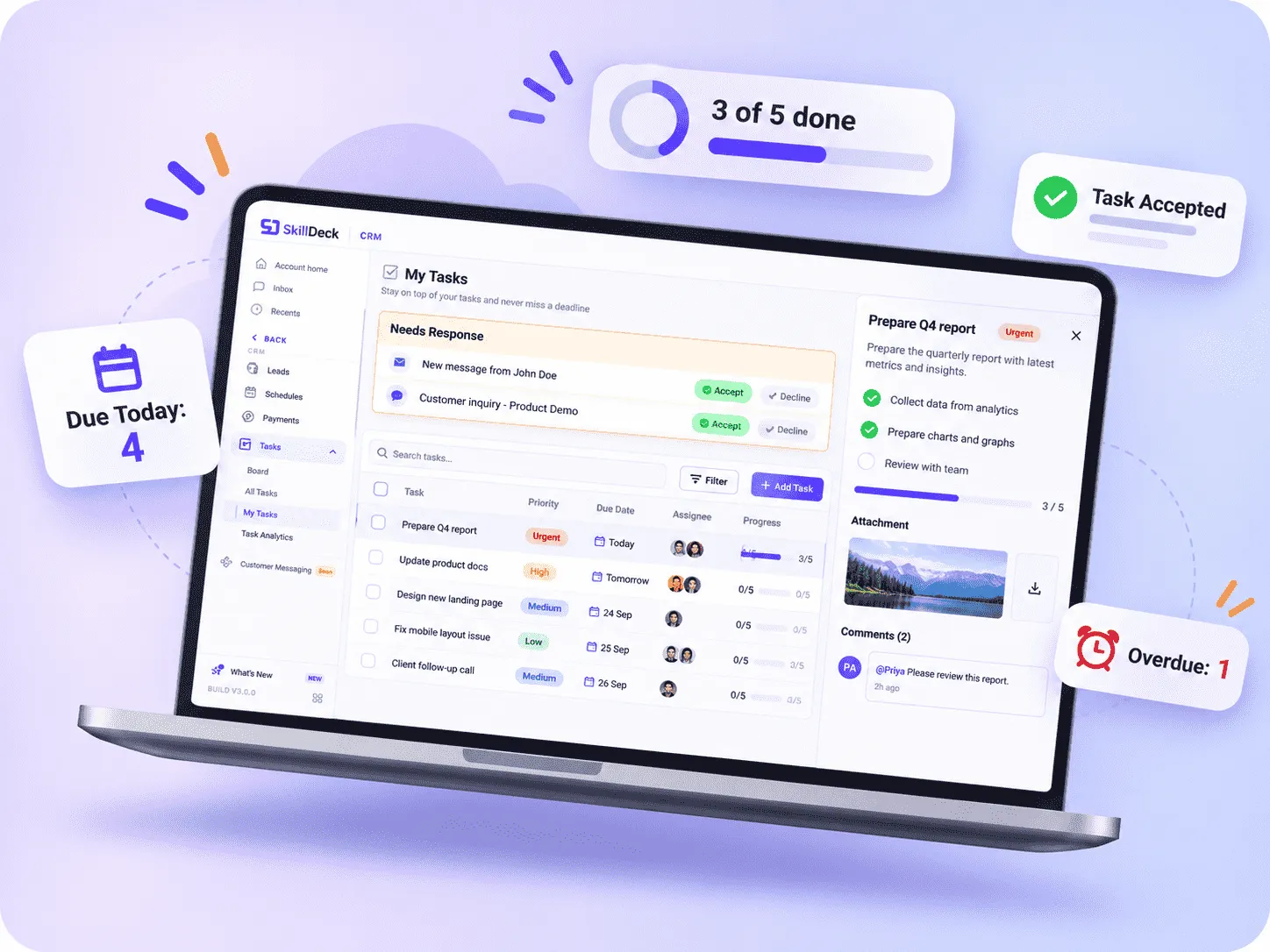
My Tasks gathers everything assigned to you in one place, across every team.
0 missed
New tasks wait under Needs Response until the assignee accepts or declines them.
4 priorities
Low, Medium, High and Urgent, so everyone knows what to pick up first.
Live progress
Checklist items show a progress bar on every task, like 3 of 5 done.
Built For Getting Daily Work Done
Most tools are built for big projects. This one is built for the dozens of small tasks that keep your business running every day.
Fast To Use
A task needs only a title. Add priority, dates, people and files only when you need them.
Confirmed Ownership
An accept or decline from every assignee replaces 'did you see my message?'.
Private Tasks
Only the assignees and the assigner can see or edit a task.
Inside Your Dashboard
Tasks sit next to your leads, schedules and payments, with no extra app to install.
Why Teams Switch From Chat And Spreadsheets
SkillDeck Task Management helps teams move everyday work out of scattered chats and spreadsheets into one organised workspace. Each task has a clear owner, priority and deadline, while acceptance responses and overdue alerts make responsibilities visible. Checklists, comments and workload views help employees stay focused, coordinate handovers and complete routine work with fewer follow-up messages.
Nothing Slips Through
Every task has an owner and a date, and overdue work stands out.
Less Chasing
Check status on the board instead of messaging people for updates.
Focus On What Matters
Urgent and high-priority tasks rise to the top of your list.
Fair Workloads
See who has too much on their plate and rebalance before deadlines are missed.
Four Steps From To-Do To Done
Write It Down
Type what needs to be done, add details and set a priority. Use @ to mention anyone who should know.
Hand It Over
Assign the task to a person or a team, with a due date or a date range.
Get A Response
The assignee sees it under Needs Response and accepts or declines, so you know it has landed.
Tick It Off
Work through the checklist, attach the result and mark it completed. Late tasks are flagged as overdue.
What You Can Track
Personal
Manager
All the context for a task lives on the task itself, not in a separate chat.
Try The Task Management Tool
Book a free demo and assign your first tasks with our team.
Flexible Pricing for Every Business
Skilldeck is made affordable for everyone. No matter the size or stage of your business, Skilldeck fits.
Starter
Best for individuals & early-stage teams getting started Everything you need to launch and validate your use case. Ideal for small teams or first-time users who want core features with essential support.
- Core features
- Limited users/projects
- Basic integrations
- Email support
Growth
Best for growing teams ready to scale Designed for businesses that need more power, flexibility, and automation as usage increases.
- Advanced features
- Higher usage limits
- Popular integrations
- Priority support
- Free SEO For CoursesFree
Business
Best for established businesses & high-volume usage Built for teams that need performance, control, and advanced collaboration across departments.
- Full feature access
- High usage & user limits
- Advanced security & permissions
- Dedicated account support
- Free SEO For CoursesFree
- Free Google Ads Up to 1 Lakh Budget₹1L Budget
Small Tasks, Clear Owners, Real Deadlines
SkillDeck keeps task management straightforward, from creating an item to confirming its completion. Teams can write a task, add the details that matter, assign it to a person or group and set a due date. Assignees respond directly, then use checklists, attachments and comments to work through the task while managers track progress.
4 statuses
Todo, In Progress, Completed and Archived.
2 date modes
A single due date or a start-to-end range.
Light By Default
Only a title is required. Everything else is optional.
Ownership Built In
Assignees respond to every task, and each person completes their own part.
Easy To Find
Search tasks and filter by status or team in the list view.
Progress Visibility
Check task status, checklist progress and overdue work from the list or board view.
One Less App For Your Team To Learn
SkillDeck brings everyday task management into the same dashboard your team uses for CRM, website and courses. Familiar list and board views make it easier to get started, while task-level privacy keeps work visible to the people involved. With human support and clear ownership, teams can coordinate routine responsibilities without learning another standalone app.
How We Partner
Zero Learning Curve
A to-do list, a board and a personal inbox, all familiar from day one.
Private And Secure
Task-level visibility keeps work between the people involved.
Human Support
Our team helps you get everyone set up.
Connected Workflow
Manage tasks alongside CRM, website and course activities from one dashboard.
500+
Businesses using SkillDeck.
4.8
Average customer rating.
Task Management From 2 People To 200
SkillDeck Task Management supports teams at different stages, from a small group sharing daily responsibilities to departments coordinating work across the business. Assign tasks to individuals or entire teams, set priorities and deadlines, and review workload or overdue items through Task Analytics. As your organisation grows, the same simple workflow can support more people and teams.
Where We Excel
Small Teams
Assign tasks between a few people with no setup at all.
Departments
Assign work to a whole team and let members pick up their part.
Managers
See workload and overdue tasks across every team in Task Analytics.
Client-Facing Teams
Manage client requests, assign follow-ups and track responsibilities with clear owners and deadlines.
Connect Tasks To The Rest Of SkillDeck
Running Bigger Projects?
See our Project Management tool for team-wide planning.
Included With Every Plan
All the essentials for everyday task management.
Accept Or Decline
Every assigned task asks for a response, so you always know it has been seen.
Needs response
New tasks wait at the top of My Tasks.
Accepted
The assignee owns it and works it to done.
Declined
You know right away to reassign it.
Services that move your training business
Everything a training business needs to grow — built, run and supported by one team.
- 01Kanban PipelineUTM & Geo CaptureLead Scoring
Customer Relationship Management
Capture every enquiry with its campaign, location and page history attached, work it on a kanban pipeline with notes, follow-ups and scoring, and see the payment it turned into — all on one record.
4.8500+ clients - 02Rich EditorPattern LayoutsScheduled Publishing
Website Builder & CMS
Run every page of your site from one place — courses, services, articles, galleries, projects and patterns — with autosaved drafts, scheduled publishing, per-page SEO and a headless API to serve it all.
4.85K+ clients - 03CSV & ExcelRow ValidationRetryable Jobs
Bulk Upload Tools
Import leads, batches, metadata and redirects from CSV or XLSX — with a template for every importer, row-level validation, retryable background jobs and a transaction behind every run.
4.8500+ clients - 04Four GatewaysCoupons & TaxFraud Signals
E-commerce Module
Sell courses, services and batch seats online through four payment gateways — with coupons, per-country tax, multi-currency pricing, refunds, fraud signals and full campaign attribution on every transaction.
4.810K+ clients - 05Session CalendarClassroom or OnlinePaid Registration
Events & Webinar Management
Schedule sessions, workshops and multi-session batches on a shared calendar with their own timezone, venue and meeting link — assign a trainer, take paid registrations and turn interest into leads.
4.8500K+ clients - 06Career PathsSalary InsightVerified Certificates
Job Portal
Show learners where a course leads — the career path, the certification route and what the skill pays — and back it with verifiable completion certificates and job-assistance flags on every batch.
4.8200K+ clients
Showing 6 of 18 servicesShowing 9 of 18 services
Task Management Tool Questions, Answered
Still not sure?
Talk to our team for a straight answer, not a sales pitch.
A team’s daily work often moves between chat messages, spreadsheets and personal reminders. When task details are scattered, people may miss deadlines, duplicate work or spend time asking who is responsible. SkillDeck brings these activities into one workspace, helping teams organise routine responsibilities and see what needs attention. As a task management tool, it gives each task a clear owner, priority and deadline.
Create tasks with a simple title, then add the details your team needs. Assign work to an individual or a team, choose a priority from Low, Medium, High or Urgent, and set a due date. For work that spans a period, use a start-to-end date range. This task assignment software helps make responsibilities visible from the moment work is handed over. Assignees can accept or decline a task, so the person assigning it can see whether the request has received a response.
A daily task tracker for teams should make progress easy to check without creating more administration. SkillDeck provides Board and list views, along with My Tasks for each member’s assigned work. Teams can review tasks by status, search for specific items and filter work by status or team. The available statuses-Todo, In Progress, Completed and Archived-help users understand where each item stands. Needs Response also highlights tasks that are waiting for an assignee’s decision.
Task tracking with due dates helps teams plan work around clear timelines. Set a single due date for a straightforward action or use a date range when a task has a longer working period. Priorities help members identify urgent responsibilities, while automatic overdue alerts make delayed work easier to spot. Managers can use Task Analytics to review workload and overdue items across teams, helping them identify where work may need to be reassigned.
A useful team to-do list app should also keep the information needed to complete work close to the task. SkillDeck supports checklists for breaking larger actions into smaller steps, attachments for related files, and comments and @mentions for task discussions. This keeps task-related context together instead of spreading instructions across separate conversations.
Privacy and access matter when several departments share a workspace. Task-level visibility means a task can be seen or edited by its assigner and assignees. Teams can coordinate work without making every task visible to everyone. Whether a small group is sharing daily duties or departments are managing responsibilities across the organisation, the same workflow can support different team sizes.
SkillDeck also connects task management with other business activities. CRM can support callback and lead follow-up tasks, Project Management can group tasks into larger projects, and Cloud Storage can keep supporting files in the media library. By combining task creation, assignment responses, priorities, deadlines, checklists and progress views, SkillDeck helps teams replace scattered reminders with a more organised routine. Teams can start with simple to-do lists and use additional details or analytics when their workflows require them. The result is a shared place to clarify responsibility, follow progress and keep everyday work moving across busy teams.