An education website is often the first place where students, learners, parents, professionals, and corporate clients interact with an educational organization. It needs to do more than display basic information. A modern education website may need to showcase courses, publish learning resources, manage multiple pages, provide user access, support registrations, communicate updates, and keep information organized across different sections. Managing all of this becomes difficult when every website update requires technical assistance. An education website CMS gives schools, colleges, institutes, academies, and training businesses a centralized way to manage their digital presence. Administrators can create and update website content, organize educational information, manage users, publish courses, and maintain learning resources without treating every content change as a development project. For education businesses that regularly introduce new programs or update information, a flexible CMS can become an important part of their digital infrastructure.
What Is an Education Website CMS?
An education website CMS is a content management system designed to help educational organizations create, organize, publish, and maintain website content. Instead of relying on developers to make routine changes, authorized administrators can manage website information through a centralized interface. An education-focused CMS may be used to manage: Website pages Course information Learning resources Faculty or instructor information Student-related content Events Announcements Blog articles FAQs Media User accounts Navigation Forms Website sections The exact functionality depends on the platform, but the objective is to make website management more practical for education teams.
Why Educational Organizations Need a CMS
Educational organizations constantly change and expand their information. A college may add a new academic program. A training institute may launch a new certification course. An academy may update its batch schedules. A professional training provider may publish a new learning resource. If every change depends on technical teams, simple updates can take longer than necessary. A CMS gives authorized staff more control over routine content management. This allows marketing, academic, admissions, and administrative teams to make appropriate website updates without creating unnecessary dependency on developers. The result is a website that can stay more closely aligned with the organization's current offerings.
Manage Website Pages From One Place
Educational websites can contain dozens or hundreds of pages. Common pages may include: About the organization Courses Programs Departments Faculty Admissions Contact information Learning resources Events Blogs FAQs Policies An education website CMS can provide a centralized environment for creating and managing these pages. Administrators can update information as requirements change while maintaining a consistent structure across the website. This is particularly useful for organizations with multiple teams contributing content.
Publish and Update Course Information
Courses are often among the most important pages on an education website. Learners want to understand what a program offers before deciding whether to enroll. A CMS can help education businesses create structured course pages containing information such as: Course title Overview Learning objectives Curriculum Duration Eligibility Learning format Instructor information Assessments Certification Enrollment information When course information changes, administrators can update the relevant content without rebuilding the page from scratch. For organizations with large course catalogs, centralized course management can also make it easier to maintain consistent information.
Manage Learning Resources
Educational organizations frequently publish resources to support learners and attract new audiences. These may include: Study materials Guides Articles Tutorials Downloadable documents Videos FAQs Course resources Reference material A CMS can provide a structured place to organize these resources. Instead of scattering learning material across different platforms, organizations can create a more connected resource experience through their website.
Control Content Without Constant Developer Support
One of the major advantages of a CMS is reducing dependency on developers for routine content work. Marketing teams may need to update a landing page. Academic teams may need to change a course description. Administrators may need to publish an announcement. These activities should not always require a new development task. With appropriate CMS permissions, authorized users can make content changes through the administrative environment. This can help organizations respond faster when information needs to change.
User Management for Education Websites
An education website may have different types of users with different responsibilities. For example, an organization may have: Website administrators Content managers Instructors Students Learners Admissions teams Marketing teams Support staff A CMS can provide role-based access so that users receive permissions appropriate to their responsibilities. This can help prevent unnecessary access while allowing different teams to contribute to website and learning operations.
Manage Different Content Types
Educational organizations rarely publish only one type of content. A website may contain course pages, blog posts, announcements, events, learning resources, promotional pages, instructor profiles, and downloadable resources. A flexible CMS should make it easier to organize these different content types. This gives administrators greater control over how information is structured and presented. For example, a training company could maintain separate content structures for its professional courses, certification programs, workshops, blogs, and learning resources.
Build Better Course Discovery Experiences
A large course catalog can become difficult to navigate if programs are not organized properly. An education website CMS can support structured categorization and navigation, helping visitors find relevant programs more easily. Courses can potentially be organized according to: Subject Skill Category Difficulty Learning format Duration Audience Certification Career area Better organization can make the website easier to explore and help visitors move from general information toward relevant course pages.
Manage Website Navigation
Website navigation plays an important role in how visitors discover educational information. As an organization adds more courses, resources, departments, and pages, navigation can become increasingly complex. A CMS can allow administrators to manage menus and page relationships so that important sections remain accessible. A structured navigation system can help visitors move between areas such as courses, resources, admissions, about pages, and contact information without unnecessary confusion.
Publish Announcements and Updates
Educational organizations regularly need to communicate changes. Examples include: New course launches Admission announcements Batch updates Events Workshops Examination information Training schedules Organizational updates A CMS can make publishing these updates more straightforward. Instead of asking technical teams to create a new page for every announcement, authorized staff can publish updates through the content management environment.
Education Website CMS for Schools
Schools may use a CMS to manage information for students, parents, teachers, and visitors. The website can contain information about: Academic programs Admissions Departments Faculty Events School activities Announcements Resources Policies Contact information A centralized CMS can help school administrators maintain this information and keep the website updated throughout the academic year.
Education Website CMS for Colleges
Colleges often have larger and more complex websites because multiple departments and academic programs need to maintain their own information. A CMS can help colleges organize: Degree programs Departments Faculty profiles Admissions information Academic resources Events News Student resources Institutional information Role-based access can also help different departments manage their relevant content while maintaining overall website control.
Education Website CMS for Training Institutes
Training institutes frequently update their course catalogs, schedules, batches, instructors, and learning resources. A CMS can help these organizations maintain current information across their websites. For example, when a training institute launches a new program, administrators can create the course page, add curriculum information, publish learning details, and connect relevant resources from the same content environment. This can reduce the operational effort involved in maintaining a growing training website.
Manage Blog and Educational Content
Educational websites can use blogs to publish useful information for learners and prospective students. Content may cover: Learning guides Career information Course explanations Industry developments Exam preparation Skill-building advice Educational resources A CMS can make it easier for content teams to draft, organize, update, and publish these articles. This gives educational organizations greater control over their content strategy while keeping the website as the central publishing destination.
Support SEO-Friendly Website Management
Educational organizations often depend on organic search to attract prospective learners. A flexible CMS can support SEO-related website management by allowing teams to control important page information. Depending on the platform, administrators may be able to manage: Page titles Meta descriptions URLs Headings Image information Internal links Page content This allows content and marketing teams to make routine SEO improvements without depending entirely on developers. SEO functionality should be considered alongside the actual content-management workflow when evaluating an education website CMS.
Manage Forms and Enquiry Pages
Educational websites often use forms to capture enquiries. Forms may be used for: Course enquiries Admissions Demo requests Counselling Contact requests Event registrations Training enquiries A CMS can help organizations manage the pages where these forms are presented and, where supported, connect them with broader lead-management workflows. This can create a smoother transition between website visitors and internal admissions or sales teams.
Connect Website Content With Learning Operations
For organizations that also operate an LMS, the website and learning environment should not feel completely disconnected. The website can introduce courses and programs, while the LMS can provide the actual learning environment. A connected education technology setup can allow an organization to move learners from: Website Discovery → Course Interest → Registration → Enrollment → Learning This creates a more complete digital journey. For training businesses and EdTech companies, connecting website management with learning operations can also reduce the need to maintain the same information manually across multiple systems.
Manage Media and Digital Assets
Education websites use many digital assets, including course images, instructor photographs, videos, documents, banners, logos, and downloadable resources. A CMS can provide a centralized environment for organizing these assets. Good asset management helps content teams find and reuse appropriate resources while keeping the website more consistent. It can also reduce the risk of repeatedly uploading duplicate files for different pages.
Role-Based Content Management
Not every person managing an education website should have complete administrative access. A CMS can use different roles to control who can create, edit, publish, or manage particular areas. For example, a content manager may update articles, while an administrator manages users and website settings. This type of access structure can make collaboration more manageable as the organization grows.
Benefits of an Education Website CMS
Faster Content Updates
Authorized teams can make routine website changes without waiting for development resources.
Centralized Website Management
Pages, courses, resources, announcements, and other content can be managed from one environment.
Better Content Consistency
Centralized templates and structures can help organizations maintain a more consistent website experience.
Improved Team Collaboration
Different teams can contribute to website management according to their assigned roles.
Reduced Technical Dependency
Content teams can handle many routine changes themselves rather than submitting development requests.
Scalable Content Operations
The CMS can provide a structured foundation as the number of pages, courses, and resources increases.
Better Learner Experience
Updated and organized information makes it easier for learners and visitors to discover relevant educational content.
More Efficient Website Maintenance
A centralized content environment makes recurring updates and content management more manageable.
Challenges of Managing an Education Website Without a CMS
Without a suitable CMS, education organizations can encounter several operational problems. Website updates may depend heavily on developers. Even a small change to a course description or announcement may require a technical request. Content can also become inconsistent when different teams maintain information separately. Another challenge is outdated information. When staff cannot update content quickly, old course details, schedules, or announcements may remain visible longer than they should. As the website grows, managing pages through static files or disconnected systems can also become increasingly difficult. A CMS addresses these challenges by creating a centralized content-management workflow.
What to Consider When Choosing an Education Website CMS
The best CMS depends on the organization's size, content volume, team structure, and digital learning requirements.
Ease of Content Management
Administrators should be able to create and update common content without requiring extensive technical knowledge.
Page Flexibility
The CMS should support different page types and layouts rather than forcing every educational page into the same structure.
User and Role Management
Check whether different teams can receive appropriate permissions.
Course Management
If courses are central to the organization, evaluate how easily course information can be created, organized, and updated.
Learning Resource Management
Consider how the platform handles documents, videos, articles, and other educational resources.
SEO Controls
Marketing teams should have access to relevant page-level SEO controls.
Integrations
Consider whether the CMS can connect with an LMS, CRM, payment system, communication tools, analytics, or other systems used by the organization.
Scalability
The platform should be capable of supporting additional pages, users, courses, departments, and content as the organization expands.
Security and Access Control
Review user permissions, administrative access, authentication, backups, and other security-related capabilities.
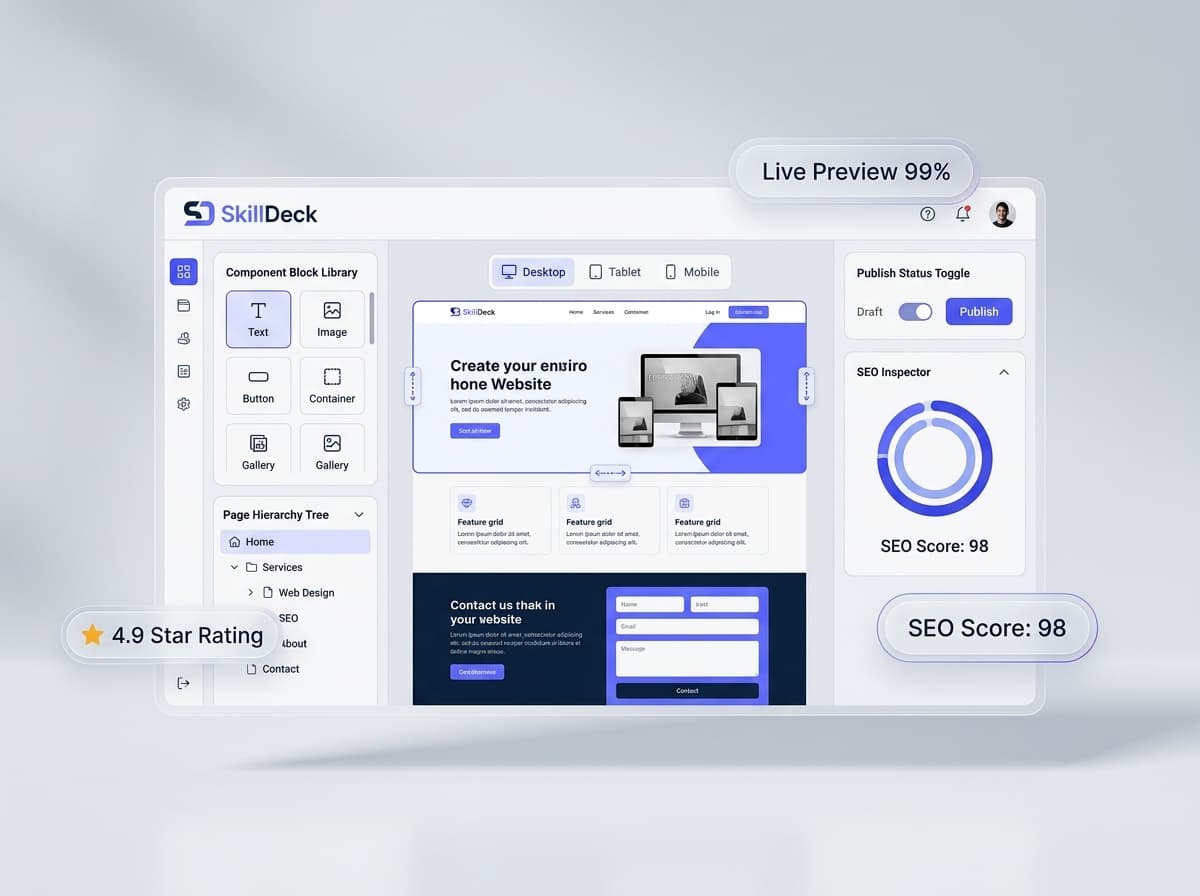
Why Skilldeck for Education Website CMS?
Skilldeck provides a connected digital environment for education and training businesses that need more than a basic website editor. An education organization can manage website content while also working with broader learning and business operations through a centralized platform. For training providers and EdTech businesses, this can create a stronger connection between the public-facing website and the operational systems behind it. Teams can organize educational content, course information, learners, and related workflows without treating the website as an isolated technology layer. The platform can also help reduce the technology burden for organizations that do not want to maintain multiple disconnected systems for their website, learning management, learner operations, and business processes. This makes the approach particularly useful for growing education businesses that want their digital infrastructure to evolve along with their course catalog and learner base.
Education Website CMS vs Traditional Website Management
Area Traditional Website Management Education Website CMS Content updates Often dependent on technical teams Managed by authorized administrators Course information Maintained as individual pages Organized through structured content User access Limited content workflows Role-based management Learning resources May be stored separately Centralized content organization Publishing Development or manual process CMS-based publishing Website growth Can become harder to manage Structured for expanding content Team collaboration Less centralized Multiple teams can contribute
How an Education CMS Supports Digital Growth
A website often starts small. An institute may initially have a few pages covering its courses, about section, and contact details. As the organization grows, the website may expand into a complete digital destination containing dozens of programs, learning resources, blogs, events, faculty information, and learner services. The CMS needs to support this growth without making content management increasingly complicated. With structured content, user roles, reusable page components, course management, and centralized administration, education businesses can build a more sustainable approach to website management. This is particularly important for organizations that frequently launch new programs and publish educational content.
Final Thoughts
An education website CMS gives schools, colleges, institutes, academies, and training businesses greater control over their digital presence. It provides a centralized environment for managing website pages, course information, users, learning resources, announcements, blogs, forms, and other educational content. The biggest advantage is not simply the ability to edit a page. It is the ability to create a structured content operation where authorized teams can keep the website current without depending on developers for every routine change. For organizations with growing course catalogs and increasingly complex digital operations, the CMS can also become part of a broader education technology ecosystem by connecting website content with learning, learner management, and business workflows. When selecting an education website CMS, organizations should therefore look beyond basic page editing. Flexibility, role management, course organization, learning resources, SEO controls, integrations, scalability, and ease of administration should all be considered. A well-designed CMS can give education businesses the control they need to maintain a professional website today while providing the foundation to support their digital learning growth tomorrow.