
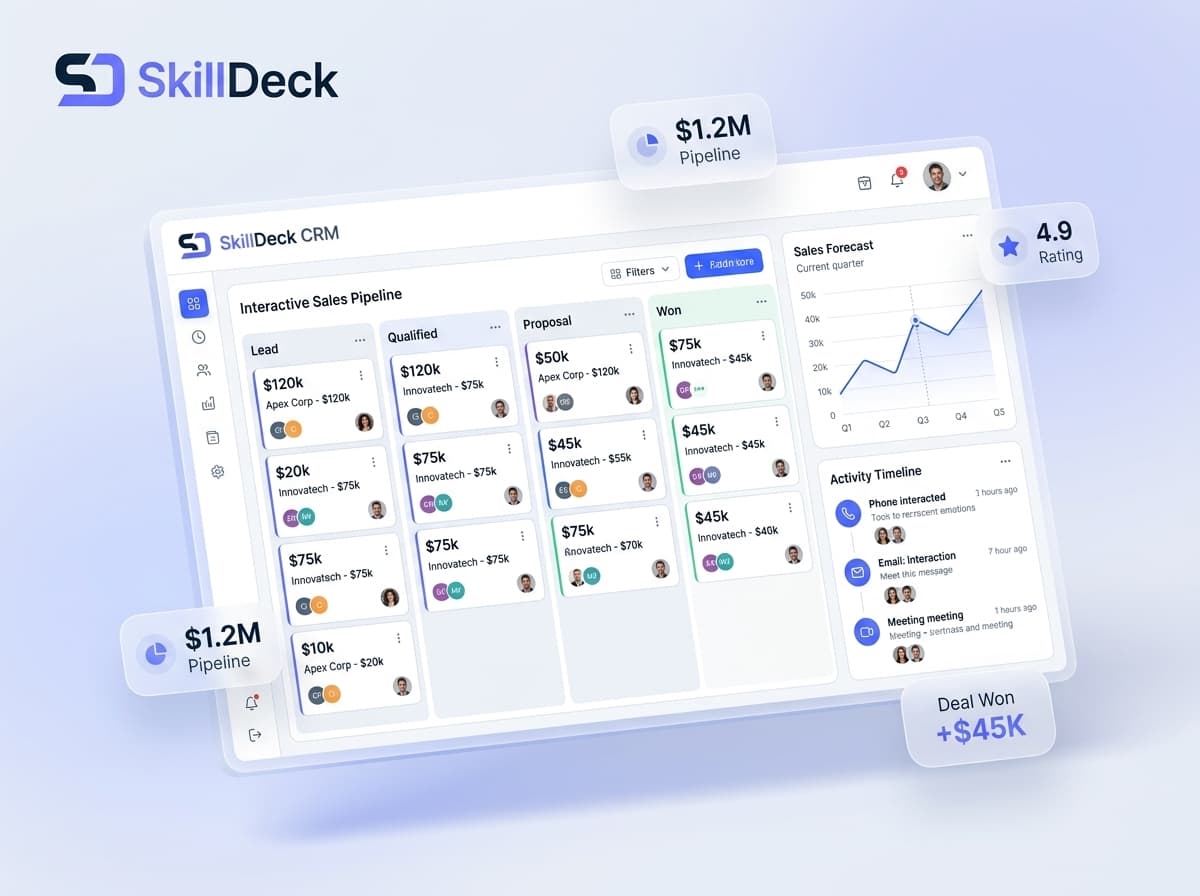
Generating leads is only the beginning of the sales process. The real challenge for many businesses is managing those leads properly after they enter the system. Prospects may come from websites, advertising campaigns, social media, referrals, landing pages, events, phone enquiries, or other channels. When these leads are handled through spreadsheets, emails, messaging applications, and disconnected tools, opportunities can easily become difficult to track.
A CRM for lead management provides a structured environment for capturing, organizing, qualifying, assigning, nurturing, and converting leads. Instead of treating every enquiry as an isolated record, businesses can create a connected process where each prospect moves through defined stages.
For growing businesses, this can make a significant difference. Sales teams can understand which leads need attention, managers can monitor pipeline movement, and marketing teams can gain better visibility into the sources generating potential customers.
In this guide, we explore what CRM for lead management means, the capabilities businesses should look for, its benefits and limitations, how to select the right solution, and how Skilldeck can support businesses looking for a more connected approach to lead and customer management.
What Is CRM for Lead Management?
CRM for lead management is a customer relationship management system designed to help businesses handle prospects from the moment they enter the sales pipeline until they become customers.
Rather than simply storing contact details, lead management CRM helps organize the activities surrounding each prospect.
A typical lead management process may involve:
- Capturing new leads
- Recording prospect information
- Identifying lead sources
- Assigning leads to team members
- Qualifying prospects
- Setting sales stages
- Scheduling follow-ups
- Recording interactions
- Managing sales activities
- Tracking opportunities
- Identifying inactive leads
- Measuring conversion
- Analyzing sales performance
The exact workflow depends on the business model, sales cycle, and CRM platform. However, the primary objective remains the same: give sales teams better control over their leads and provide visibility into what happens at every stage of the pipeline.
Why Do Businesses Need CRM for Lead Management?
Lead management becomes increasingly difficult as the number of prospects grows.
A small business may initially manage enquiries through a spreadsheet. Sales representatives might remember follow-up dates themselves or maintain separate notes for conversations.
This approach can become difficult to maintain when several employees are handling hundreds or thousands of leads.
Common lead management problems include:
- Leads coming from multiple sources
- Duplicate prospect records
- Unclear lead ownership
- Missed follow-ups
- Incomplete prospect information
- Difficulty identifying high-value opportunities
- Leads remaining inactive for long periods
- Limited visibility into salesperson activity
- Manual pipeline reporting
- Difficulty measuring lead conversion
A CRM can bring these activities into one organized system.
Instead of asking, "Who is handling this lead?" or "When was the last follow-up?", teams can refer to the lead record and pipeline information.
This creates a more structured approach to sales operations and allows managers to identify where opportunities are being delayed or lost.
Key Features of CRM for Lead Management
1. Multi-Source Lead Capture
Leads rarely come from just one channel.
Businesses may receive prospects through websites, contact forms, advertisements, social media, email campaigns, referrals, webinars, events, marketplaces, or direct enquiries.
A lead management CRM can bring these prospects into a centralized database.
This reduces the need for sales teams to monitor every source separately and gives organizations a clearer view of their incoming opportunities.
2. Lead Source Identification
Knowing where a lead originated is important for understanding acquisition performance.
A CRM can associate prospects with their source so businesses can compare different channels.
For example, leads may be categorized as:
- Website
- Search advertising
- Social media
- Referral
- Email campaign
- Event
- Partner
- Organic search
- Direct enquiry
This information can help businesses understand which sources are producing opportunities and where marketing efforts may need adjustment.
3. Lead Deduplication and Data Organization
Multiple enquiries from the same prospect can create duplicate records.
For example, a person may first submit a website form and later contact the business through another campaign.
Without proper data organization, the sales team may treat these as separate prospects.
CRM systems can help maintain cleaner records by organizing prospect information and reducing unnecessary duplication.
A well-maintained database makes it easier for sales representatives to understand the complete history of a lead.
4. Lead Qualification
Not every lead has the same level of buying intent.
Some prospects may only be researching a product, while others may already be comparing prices or preparing to make a purchase.
A CRM can help teams classify prospects according to their qualification criteria.
Businesses can use information such as:
- Product interest
- Budget range
- Business requirement
- Purchase timeline
- Engagement level
- Customer type
- Previous interaction
- Sales readiness
This allows teams to focus their efforts according to the potential value and readiness of each lead.
5. Lead Scoring
Lead scoring can help businesses prioritize prospects.
A scoring model can assign values based on selected actions or characteristics.
For example, a prospect who repeatedly visits a product page, requests pricing information, attends a webinar, or responds to communication may receive a higher score than someone who has only submitted a basic enquiry.
The scoring rules should be designed around the organization's actual sales process.
When used appropriately, lead scoring can help sales teams determine which prospects may deserve earlier attention.
6. Automatic Lead Assignment
As lead volumes increase, manually distributing every enquiry can become time-consuming.
CRM workflows can assign new leads according to predefined rules.
Assignment can be based on:
- Sales team
- Geographic region
- Product interest
- Lead source
- Customer segment
- Business size
- Availability
- Sales specialization
Clear ownership makes it easier to determine who is responsible for the next action.
7. Sales Pipeline Management
A lead pipeline provides a visual representation of where prospects currently stand.
A business may create stages such as:
New Lead → Contacted → Qualified → Proposal → Negotiation → Won / Lost
The stages should reflect the company's actual sales process rather than forcing every business into the same structure.
Pipeline visibility helps sales representatives understand their current workload and allows managers to identify opportunities that may be stuck between stages.
8. Activity and Interaction History
A prospect may communicate with a business several times before making a decision.
A CRM can maintain information about relevant interactions so sales representatives can understand what has already happened.
This may include:
- Calls
- Emails
- Meetings
- Notes
- Enquiries
- Proposals
- Follow-up activities
- Previous conversations
Having this context available can make future interactions more consistent and reduce the need to repeatedly ask prospects for the same information.
9. Follow-Up Scheduling
One of the most important parts of lead management is knowing when to contact a prospect again.
CRM software can help sales representatives schedule follow-up activities and organize their daily tasks.
Instead of relying on memory or separate reminder applications, follow-up information can remain connected to the lead record.
This creates greater accountability and reduces the risk of promising opportunities being forgotten.
10. Lead Nurturing Workflows
Some prospects are not ready to purchase immediately.
They may need additional information, product demonstrations, pricing details, educational content, or time to make a decision.
Lead nurturing workflows can help businesses maintain communication with these prospects over time.
Automation can be used for appropriate activities such as sending relevant information, reminders, or scheduled communication.
The goal is not simply to send more messages, but to maintain useful engagement until the prospect becomes ready for the next sales step.
11. Inactive Lead Management
Some leads stop responding after their initial interaction.
Without proper tracking, these prospects can disappear from the active pipeline.
CRM systems can help identify leads that have remained inactive for a defined period.
Sales teams can then review whether the lead should be contacted again, moved into a nurturing workflow, or marked as inactive.
This creates a more systematic approach to managing dormant opportunities.
12. Lost Lead Analysis
A lead that does not convert can still provide useful information.
CRM systems can record reasons for lost opportunities.
Possible reasons may include:
- Pricing
- Product mismatch
- Competitor selection
- Timing
- Lack of budget
- No current requirement
- Incomplete qualification
Analyzing these reasons can help businesses identify recurring problems in their sales process and improve future lead handling.
13. Conversion Tracking
Lead management should ultimately connect activity with business outcomes.
CRM reporting can help businesses measure how many leads move from one stage to another and how many eventually become customers.
Organizations may track:
- Lead-to-opportunity conversion
- Opportunity-to-customer conversion
- Overall conversion rate
- Conversion by source
- Conversion by salesperson
- Conversion by product
- Conversion by campaign
This gives management a more useful understanding of sales performance.
14. Sales Team Performance Monitoring
A lead management CRM can also provide visibility into sales activity.
Managers can review factors such as:
- Leads assigned
- Leads contacted
- Follow-ups completed
- Opportunities created
- Deals closed
- Conversion performance
- Pending activities
- Inactive opportunities
This can help managers identify workload issues, process gaps, and areas where sales teams may require additional support.
Benefits of CRM for Lead Management
Better Lead Organization
A centralized system gives businesses one place to manage prospects instead of maintaining scattered spreadsheets and communication records.
Fewer Missed Opportunities
Follow-up scheduling, ownership rules, and pipeline visibility can help reduce the number of leads that are forgotten or left unattended.
Faster Lead Handling
When new enquiries are captured and assigned systematically, sales teams can spend less time organizing records manually.
Improved Sales Prioritization
Lead qualification and scoring can help teams concentrate their efforts on prospects that match their sales criteria.
Greater Pipeline Visibility
Managers can understand how many opportunities are active, which stages contain the most prospects, and where leads may be getting delayed.
More Consistent Customer Interactions
Access to previous communication and prospect information allows representatives to continue conversations with better context.
Better Marketing Evaluation
Lead-source tracking can connect marketing activities with the prospects entering the sales pipeline.
More Informed Decisions
Conversion and performance reports provide data that can support sales planning, campaign optimization, and resource allocation.
Challenges and Limitations of Lead Management CRM
Data Quality
A CRM is only as useful as the information stored inside it. Incorrect contact details, duplicate records, and incomplete lead information can reduce the value of reports and workflows.
Sales Team Adoption
Employees need to consistently update lead stages, activities, notes, and follow-up information. If important activities remain outside the CRM, management visibility becomes incomplete.
Complex Sales Processes
Businesses with multiple products, customer types, territories, or sales cycles may need more customized pipelines and workflows.
Integration Requirements
A lead management CRM may need to connect with websites, advertising platforms, email systems, communication tools, forms, payment systems, or other business applications.
Initial Configuration
Lead fields, stages, assignment rules, qualification criteria, automation, and reports need to be configured according to the business process.
Ongoing Management
CRM implementation is not a one-time activity. Businesses need to maintain data quality, review workflows, train employees, and adjust processes as sales operations change.
How to Choose the Right CRM for Lead Management
1. Understand Your Lead Process
Before selecting software, document how a lead enters your business, who receives it, how it is qualified, what happens during follow-up, and how it becomes a customer.
The CRM should support this process rather than forcing the business to completely change its workflow.
2. Check Lead Capture Options
Evaluate whether the platform can receive leads from the channels your business actually uses.
A CRM becomes more valuable when incoming enquiries can be organized without excessive manual data entry.
3. Review Qualification and Scoring
Check whether the system allows you to define the criteria your sales team uses to determine lead quality and priority.
4. Examine Workflow Automation
Look for automation capabilities covering lead assignment, reminders, follow-ups, status updates, nurturing, and other repetitive activities.
5. Evaluate Pipeline Flexibility
The sales pipeline should be customizable enough to reflect your products, customer segments, and sales cycle.
6. Check Reporting Capabilities
Reports should help management understand lead volume, sources, sales activity, conversion, pipeline movement, and lost opportunities.
7. Consider Integrations
Review how easily the CRM can work with your existing website, forms, marketing systems, communication channels, and other operational tools.
8. Think About Future Growth
A CRM should be able to support increasing lead volumes, additional users, new sales teams, different products, and expanding business operations.
Why Skilldeck Can Be a Strong Choice for Lead Management
Lead management does not operate independently from the rest of a business.
A website generates enquiries, marketing attracts prospects, CRM organizes relationships, and other business systems support the customer journey. When these functions operate through disconnected platforms, teams may spend additional time moving information between systems.
Skilldeck takes a broader approach by bringing together website, LMS, CRM, marketing, and business capabilities within an integrated environment for training and education businesses.
Centralized Business Environment
Instead of treating lead management as an isolated tool, an integrated platform can connect prospect information with other business activities.
This can provide a more unified environment for managing:
- Leads
- Customers
- Courses
- Website enquiries
- Marketing activities
- CRM workflows
- Learning operations
- Business processes
For training and education businesses, this broader connection can reduce the need to maintain completely separate systems.
CRM Connected With Other Operations
Lead management becomes more useful when the CRM is connected to what happens after conversion.
For example, a training business may capture a prospect, convert them into a learner, enroll them into a course, and continue managing their relationship after enrollment.
Skilldeck's broader platform approach combines CRM and LMS capabilities, supporting a connected flow between customer acquisition and learning operations.
Marketing and Lead Management Connection
Marketing teams generate interest, while sales and admissions teams work to convert that interest.
Connecting these functions can provide better visibility into where leads originate and how they progress.
Skilldeck combines marketing, website, and CRM capabilities as part of its broader platform approach, helping businesses reduce fragmentation between lead generation and relationship management.
Workflow Automation
Lead management often includes repetitive tasks such as assigning enquiries, creating reminders, updating statuses, and sending routine communication.
Automation can reduce manual coordination and allow teams to spend more time on activities requiring direct customer interaction.
Reduced Technology Complexity
Using independent platforms for websites, CRM, marketing, learning management, and other operations can create additional integration and maintenance requirements.
Skilldeck's integrated approach is designed to reduce this technology burden by bringing key capabilities into one broader ecosystem.
Suitable for Growing Training Businesses
As an organization expands, lead volumes, users, courses, marketing activities, and customer interactions can all increase.
A centralized platform can provide a more consistent foundation for managing these growing requirements rather than adding disconnected tools for every new operational need.
Traditional Lead Handling vs. CRM-Based Lead Management
Area | Traditional Lead Handling | CRM-Based Lead Management |
|---|---|---|
Lead Capture | Multiple sources and manual entry | Centralized lead collection |
Lead Ownership | Often unclear | Assigned systematically |
Qualification | Manual judgment and notes | Structured criteria |
Follow-Ups | Separate reminders | CRM-based activities |
Pipeline | Spreadsheets or informal tracking | Defined sales stages |
Lead History | Scattered across channels | Centralized record |
Lead Priority | Difficult to compare | Scoring and segmentation |
Inactive Leads | Easy to overlook | Identifiable through CRM data |
Conversion Tracking | Manual calculation | Automated reporting |
Team Visibility | Limited | Centralized pipeline view |
Final Verdict
CRM for lead management is not simply a digital address book. It provides businesses with a structured way to control what happens to prospects after they enter the sales pipeline.
From lead capture and qualification to assignment, follow-up, nurturing, pipeline management, and conversion tracking, a well-configured CRM can bring greater organization to the entire lead management process.
The right solution should make it easier for sales teams to know which leads require attention, who is responsible for them, what has already happened, and what action should come next.
Businesses should also look beyond basic contact management when evaluating CRM software. Lead scoring, source tracking, automated workflows, pipeline customization, interaction history, inactive lead management, reporting, and integrations can all influence how effectively a CRM supports the sales process.
For training and education businesses, the requirement can be broader because lead management is closely connected with websites, marketing, admissions, learner information, and learning operations.
Skilldeck provides an integrated platform approach that brings together CRM with website, marketing, LMS, and other business capabilities for training businesses.
Ultimately, the value of CRM for lead management comes from turning a collection of enquiries into an organized sales process. When lead information, ownership, communication, follow-ups, and conversion data are connected, businesses can create a more consistent path from first enquiry to customer relationship.