Corporate training is no longer limited to occasional workshops or classroom sessions. Organizations continuously need to onboard new employees, develop existing teams, introduce new skills, communicate internal processes, support compliance requirements, and prepare employees for changing business needs. Managing all of this through spreadsheets, emails, shared folders, and separate training tools can quickly become difficult. An LMS for corporate training gives organizations a centralized environment to manage employee learning and development. It allows HR, L&D teams, managers, trainers, and employees to work within a structured learning system where training programs, course content, assessments, progress, certificates, and reports can be managed more efficiently. For organizations with multiple departments, teams, locations, or learning requirements, a corporate LMS can provide the structure needed to make employee training more consistent and easier to monitor.
What Is an LMS for Corporate Training?
An LMS for corporate training is a learning management system designed to help businesses manage employee education and professional development. Instead of treating every training program as a separate activity, an LMS brings learning operations into one connected platform. Organizations can create training programs, enroll employees, assign courses, monitor participation, conduct assessments, issue certificates, and review learning reports. The system can support different types of corporate learning, including: New employee onboarding Technical and functional training Product training Leadership development Soft-skills training Compliance and policy training Workplace safety training Sales training Customer service training Professional upskilling Role-specific learning Continuous employee development The exact learning structure can be adapted according to the organization's workforce, departments, job roles, and training objectives.
Why Businesses Need a Corporate Training LMS
As organizations grow, employee training becomes more difficult to coordinate manually. HR teams may need to manage hundreds or thousands of learners while L&D teams need to understand who has completed required training, which courses are pending, and where employees may need additional support. A corporate LMS creates a central source of learning information. It can help organizations move away from scattered training records and create a more organized learning process. Employees can access assigned courses through a common platform, while administrators can monitor training activity without depending entirely on manual updates. The value is particularly noticeable when training needs to be repeated across departments, locations, or employee groups.
Key Features of an LMS for Corporate Training
Employee Learning Profiles
A corporate LMS can maintain individual learner profiles containing relevant training information. HR and L&D teams can use these profiles to understand assigned courses, completed learning, assessment results, certificates, and other training activities. This creates a more complete view of an employee's learning journey.
Department and Team-Based Learning
Different teams rarely have identical training requirements. A sales employee may need product and communication training, while a technical employee may require specialized technical courses. An LMS can organize learners according to departments, teams, roles, locations, or other organizational structures. Training can then be assigned according to the needs of each group.
Course and Content Management
Corporate training often involves different types of learning materials. An LMS can provide a centralized place to organize courses and learning resources. Depending on the platform, organizations may be able to deliver: Video lessons Documents Presentations Interactive learning material Assessments Assignments Supporting resources Course modules Keeping these resources within a structured learning environment makes it easier for employees to find and complete their assigned training.
Employee Onboarding
A new employee may need to complete several learning activities during the first few weeks of joining an organization. Instead of manually sending training instructions, organizations can create onboarding learning paths that introduce employees to company policies, processes, tools, teams, products, and role-specific knowledge. Managers and HR teams can then monitor whether the required onboarding learning has been completed.
Role-Based Training Assignments
Not every employee needs access to the same training. Role-based learning helps organizations deliver relevant courses to specific groups. For example, a company could create separate learning requirements for: Managers Sales representatives Developers Customer support teams HR teams Operations staff New employees Team leaders This reduces unnecessary assignments and helps employees focus on training relevant to their responsibilities.
Learning Paths
Some skills cannot be developed through a single course. Employees may need to complete multiple courses in a particular sequence. Learning paths allow organizations to structure training as a progression. An employee might first complete an introductory course, followed by intermediate training, an assessment, and finally an advanced module. This creates a more organized development journey instead of presenting employees with an unstructured list of courses.
Assessments and Knowledge Checks
Training completion alone does not always indicate whether an employee understood the subject. An LMS can include quizzes, tests, assignments, and other assessment activities to evaluate learner understanding. Results can be recorded alongside course participation, helping L&D teams identify areas where additional learning may be useful.
Progress Tracking
One of the most important functions of a corporate training LMS is visibility into learning progress. Administrators and managers can monitor information such as: Courses assigned Courses started Courses completed Assessment performance Pending learning Training participation Certificate status This makes it easier to identify employees who may require reminders or additional support.
Certification Management
Some corporate programs require employees to demonstrate successful completion through certificates. An LMS can support certificate-based learning programs by recording completion and certification information. Where recurring training is required, organizations can also maintain visibility into certificate validity and renewal requirements, depending on the platform's capabilities.
Automated Notifications and Reminders
Manual reminders can consume considerable administrative time, especially when employees are completing recurring or mandatory training. Automated notifications can help remind learners about upcoming training, pending courses, assessments, or other learning activities. This keeps employees informed without requiring HR or L&D teams to follow up individually every time.
Training Reports and Analytics
Corporate training generates valuable information about employee participation and learning performance. An LMS can organize this information into reports that help L&D teams understand training activity across departments, teams, courses, and employees. Reports can support questions such as: Which employees have completed assigned training? Which departments have pending learning? Which courses have the highest participation? How are employees performing in assessments? Which training programs require additional attention? These insights can make training management more data-driven.
How a Corporate LMS Supports Different Stages of Employee Development
A corporate training LMS can support employees throughout their relationship with an organization rather than being used only during onboarding.
Joining the Organization
New employees can receive structured onboarding courses covering company information, policies, processes, tools, and role-specific knowledge.
Building Job Skills
Employees can receive training related to the skills required for their current responsibilities.
Developing New Capabilities
Upskilling and reskilling programs can help employees prepare for new technologies, processes, responsibilities, or business requirements.
Preparing Future Leaders
Organizations can create learning programs for supervisors, managers, and employees preparing for leadership responsibilities.
Continuous Professional Development
Employees can continue learning through ongoing courses, assessments, certifications, and professional development programs. This makes the LMS part of a continuous learning strategy rather than a one-time training tool.
Benefits of Using an LMS for Corporate Training
Centralized Training Management
Training information can be managed through one platform instead of being distributed across spreadsheets, email conversations, folders, and unrelated applications.
More Consistent Training Delivery
Organizations can provide standardized learning material to employees while still creating different programs for specific roles and teams.
Reduced Administrative Work
Course assignment, reminders, progress tracking, and reporting can be streamlined, allowing HR and L&D teams to spend more time on learning strategy and employee development.
Better Employee Visibility
Employees can see their assigned learning and progress in one place, while managers and administrators can gain broader visibility into training participation.
Scalable Learning Operations
A structured LMS becomes increasingly useful as the number of employees, departments, courses, and training programs grows.
Improved Training Accountability
Recorded learning activity makes it easier to understand who has completed training and which activities remain pending.
Better Learning Decisions
Training reports can help organizations identify participation patterns, assessment performance, and areas where learning programs may need improvement.
Common Corporate Training Use Cases
An LMS for corporate training can be used across many business functions.
Employee Onboarding
Create structured onboarding programs for new employees and track their progress during the initial learning period.
Product Training
Sales, support, and customer-facing employees can learn about products, features, processes, and updates.
Technology Training
Technical teams can complete courses related to software, tools, development practices, infrastructure, or other technical skills.
Leadership Development
Organizations can create structured programs for managers and future leaders.
Compliance Learning
Required organizational or regulatory training can be assigned and monitored through centralized learning records.
Sales and Customer Service Training
Organizations can train customer-facing teams on communication, sales processes, products, customer handling, and service standards.
Upskilling and Reskilling
Employees can learn new capabilities as business processes and technology requirements change.
Challenges Without a Corporate Training LMS
Organizations that manage training manually may encounter several operational difficulties. Training records can become scattered across spreadsheets and files. Employees may miss important learning deadlines because reminders depend on manual communication. Managers may have limited visibility into team progress, while L&D teams can spend significant time preparing reports. Another challenge is consistency. When different teams deliver similar training separately, employees may receive different materials, instructions, or learning experiences. As the organization expands, these problems can become harder to control. A centralized LMS helps create a more structured foundation for managing these activities.
What to Look for When Choosing an LMS for Corporate Training
Choosing an LMS should go beyond checking the number of features listed by a software provider. Organizations should consider how the platform fits their actual training workflows.
Ease of Administration
HR and L&D teams should be able to create courses, assign learners, monitor progress, and generate reports without unnecessary complexity.
Scalability
The platform should be capable of supporting growing numbers of employees, courses, departments, and training programs.
Flexible Learning Structures
Look for support for role-based assignments, departments, learning paths, assessments, certifications, and different training formats.
Reporting Capabilities
Reports should provide useful information rather than simply displaying raw activity data.
User Experience
Employees are more likely to engage with training when the platform is easy to navigate and learning resources are simple to access.
Automation
Consider whether the LMS can automate repetitive activities such as assignments, notifications, reminders, and progress-related workflows.
Integration
Organizations should evaluate how well the LMS can connect with other systems used for employee, business, communication, or operational management.
Why Skilldeck for Corporate Training?
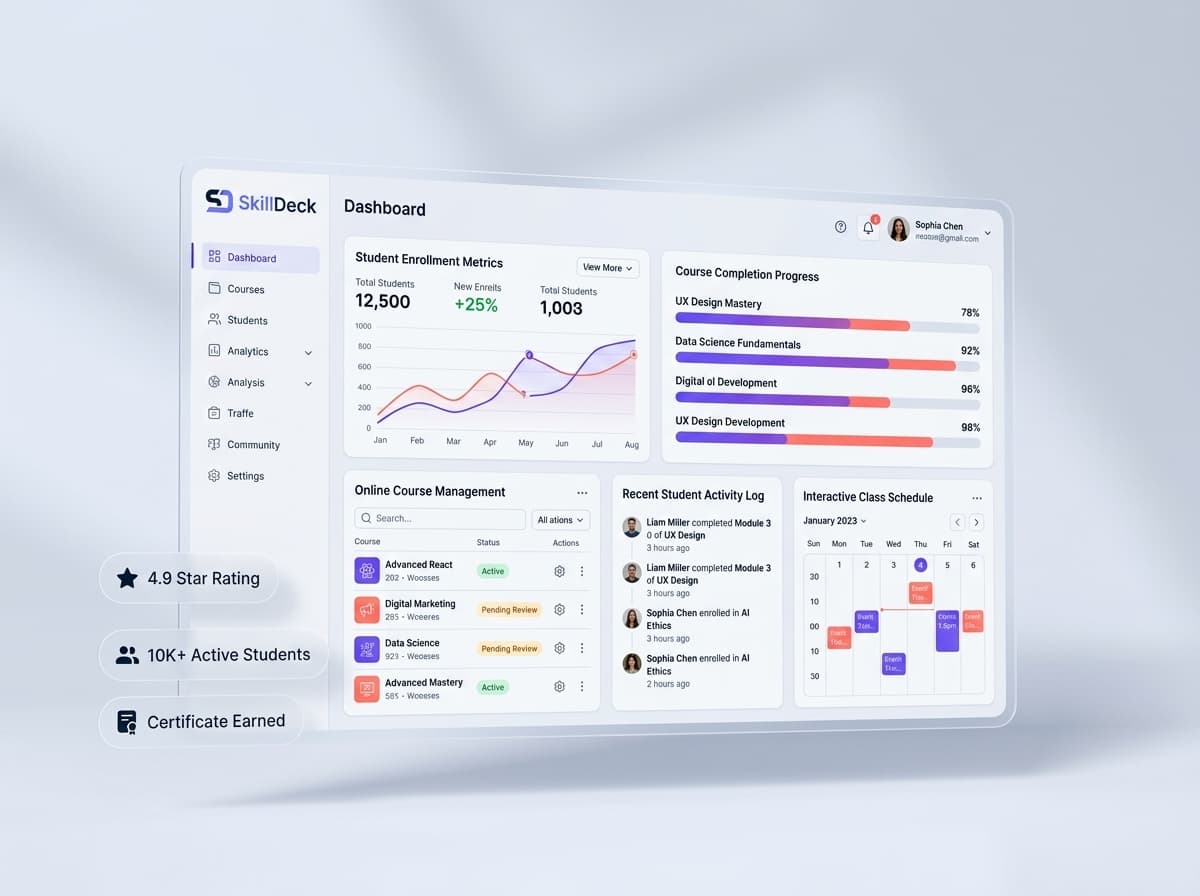
Skilldeck can provide organizations with a connected environment for managing corporate learning and training operations. Instead of treating course delivery as an isolated activity, the platform can help bring learner management, training administration, communication, and operational workflows into a more unified system. For corporate teams, this can be useful when training involves different employee groups, departments, programs, and ongoing learning activities. Skilldeck can help organizations structure employee learning through course management, learner organization, training assignments, assessments, progress tracking, certificates, notifications, and reporting. The platform's broader learning and business capabilities can also support organizations that want their training operations to work alongside other processes rather than relying on disconnected systems. For L&D teams, this means having a more centralized environment to manage learning activities. For employees, it can provide a clearer place to access assigned training and monitor their own learning progress.
Corporate Training LMS vs. Manual Training Management
Area Manual Training Management Corporate Training LMS Course delivery Often handled through multiple tools Centralized learning environment Employee assignments Manual communication Structured course assignment Progress tracking Spreadsheets and individual updates Centralized progress records Reminders Manual follow-ups Automated notifications and reminders Assessments Separate forms or tools Integrated learning assessments Certificates Manually maintained records Centralized certification information Reporting Time-consuming data collection Organized training reports Scalability Becomes difficult as teams grow Designed for structured, scalable learning
Final Thoughts
An LMS for corporate training provides more than a place to upload employee courses. It creates a structured environment for managing learning throughout the employee lifecycle, from onboarding and role-based training to upskilling, leadership development, assessments, certifications, and continuous professional development. For organizations managing multiple teams or large training programs, centralizing these activities can improve visibility and reduce the administrative effort associated with manual training management. The right corporate LMS should therefore be evaluated based on how effectively it supports the organization's people, learning objectives, workflows, and future growth. A platform such as Skilldeck can provide a connected foundation for organizations looking to bring corporate learning and training management into a more organized digital environment.